To determine your skin tone for IPL hair removal, check the skin you actually plan to treat while it is clean, dry, and untanned, then compare that area with the chart for your exact device. If the shade is close to the darker end of the approved range, treat that as a caution sign rather than something to guess around.
How to check your skin tone for IPL
The safest order is simple: start with your natural tone, check the treatment area, match it to the brand chart, then use the sensor if your device has one. Do not rely on a general idea of being "fair," "medium," or "olive," because home IPL devices are approved by shade range, not by broad complexion labels.
Start with your natural untanned skin
Your baseline should be skin that has not been recently darkened by sun, tanning beds, or self-tanner. A covered area such as the upper thigh can help you judge your natural tone, but it should not be the final answer if the area you want to treat is darker.
Good daylight helps. Bathroom lighting can make skin look flatter or warmer than it really is, which is exactly how people end up choosing a shade that is too light on a chart.
Check the area you plan to treat
Use the darkest part of the treatment area for your decision. Legs, underarms, bikini line, forearms, and face can all sit in slightly different shade ranges, especially if some areas get more sun or friction.
- Summer legs: lower legs may be darker than thighs after shorts weather.
- Underarms or bikini line: friction and shaving marks can create darker patches.
- Face: sun exposure and skincare can make it a poor guide for body treatments.
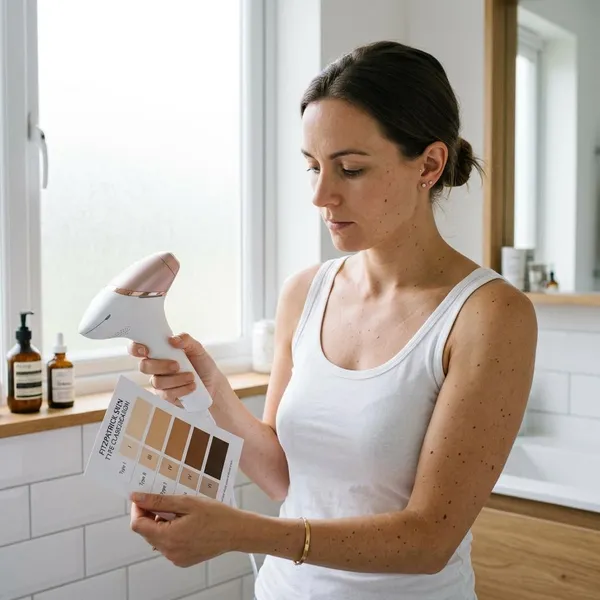
Compare it with the brand's skin tone chart
Use the chart from your device manual or the official product page, not a generic IPL chart online. Different models can have different supported ranges, so a shade that is acceptable for one device may not be approved for another.
If your skin falls between two chart shades, choose the darker shade when deciding. If that darker match is outside the supported range, do not treat that area unless the manufacturer gives specific guidance saying it is allowed.
Use the skin tone sensor if available
A built-in sensor is useful because it checks the skin against that device's limits and may adjust the intensity automatically. Use it on clean, dry skin before flashing each area, especially when moving from one body zone to another.
Do not try to outsmart a blocked sensor. If the device refuses to flash, that usually means the area is not suitable at that moment, the contact is poor, or something on the skin is interfering with the reading.
What can change your IPL skin tone match
Your match is not fixed for the whole year. A shade that was fine in winter may be too dark after a holiday, and one body area can change while another stays the same.
Recent tanning
A tan adds pigment to the skin, which can make IPL less safe because the skin may absorb more light energy. This matters even if the tan looks mild, especially on areas such as forearms, lower legs, shoulders, or the upper lip.
If the treatment area still looks darker than a normally covered area, wait and recheck later. Skipping one session is usually a better choice than treating skin that has not returned to its usual shade.
Self-tanner
Self-tanner can confuse the check because it darkens the surface of the skin even though it is not a natural tan. Patchy fake tan is especially unhelpful because one section may look safe while another reads darker.
Wait until the color has fully faded and the area looks even before comparing it with the chart or using the sensor.
Different body areas
Do not check one "representative" spot and apply the result everywhere. Someone might be a clear match on the thighs but borderline on the shins, or fine on the arms but not on darker underarm patches.
A practical way to handle this is to treat each zone like a separate decision: legs, underarms, bikini line, face, and arms all get their own check.
Changes between treatments
Recheck before sessions when anything has changed: recent sun, a new skincare product, irritation from shaving, healing marks, or a longer gap between treatments. The check does not need to be complicated, but it should not be skipped out of habit.
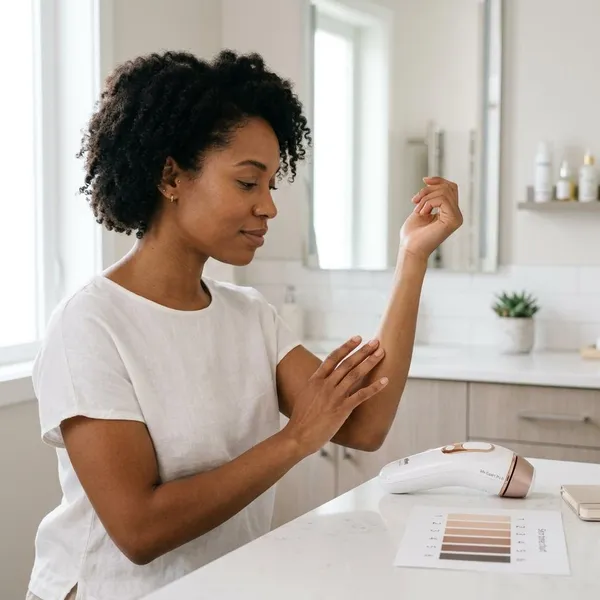
How to confirm your skin tone is suitable for IPL
A visual match is only the first filter. To feel more confident, combine the chart, the device's supported range, any scan feature, and a small skin test before treating a full area.
Check the device's supported range
Look for the approved skin tone range in the manual or official listing for your exact model. Pay attention to excluded shades, warnings about darker spots, and whether the device changes intensity automatically or only works at fixed settings.
A lower intensity setting should not be treated as a workaround for skin outside the approved range unless the brand clearly says so. More melanin in the skin can mean more heat in the skin, not just weaker hair-targeting.
Recheck after tanning
After tanning, compare the treatment area again in daylight and use the chart as if you were starting from scratch. If you are between your usual shade and a darker shade, use the darker match for safety.
Run the skin tone scan
If your device has a scan or contact sensor, run it on every area you plan to treat. This is especially helpful for year-round users, because the same routine can feel safe in winter but need a pause after summer sun.
- Scan bare skin: no makeup, oil, lotion, or self-tanner residue.
- Scan the actual zone: do not scan a lighter nearby area.
- Respect a no-flash result: move on, recheck, or wait rather than forcing it.
Complete the required skin test
A small skin test is the final reality check, because suitable-looking skin can still react badly. Follow the timing in your device instructions; many brands ask you to wait before treating the full area so delayed redness or irritation has time to show.
- Choose a small spot within the exact treatment area.
- Shave and clean the skin as you would before a normal session.
- Use the recommended starting level for your skin tone.
- Wait the required observation period before treating more skin.
What else to check before using IPL
Skin tone matters most for safety, but it is not the only yes-or-no check. Hair color, body area, skin condition, and device warnings can all change whether IPL is a sensible choice for you.
Hair color compatibility
IPL usually works best when there is enough pigment in the hair for the light to target, which is why dark blonde, brown, and black hair often respond better than very light blonde, white, grey, or many red hairs. Check the root color rather than bleached or sun-lightened ends.
Treatment area restrictions
Use the device only on areas the brand approves. Many home IPL devices are intended for legs, arms, underarms, bikini line, and sometimes the face below certain points, but restrictions vary.
Avoid tattoos, large moles, very dark marks, irritated skin, and areas close to the eyes unless your manual clearly allows a specific use. Pigmented spots can absorb more light than surrounding skin, even when the rest of the area looks suitable.
Device-specific warnings
Read the warnings before the first session and again if your health, medication, or skincare routine changes. Be extra cautious with photosensitizing medication, strong exfoliating acids, retinoids, recent cosmetic treatments, broken skin, eczema flares, or a history of pigmentation after irritation.
Conclusion
The safest approach is to judge the exact treatment area at its darkest current shade, not the shade you usually are or the shade you wish matched the chart. If your skin is untanned, within the device's supported range, accepted by the sensor, and calm after a small test, IPL is much more likely to be a sensible choice; if any of those checks feels uncertain, waiting and rechecking is the smarter move.